I Sent 40 LinkedIn Connection Requests to Recruiters
The advice you have heard a hundred times is “always add a personalized note.” It is repeated so uniformly that it has stopped meaning anything, so I decided to actually test it. I sent forty connection requests to recruiters — some with no note at all, some with the generic “personalized” note everyone sends, and some with a specific one — and scored each on two things: did they accept, and did they reply. The result that surprised me: the generic personalized note, the one the advice tells you to send, performed worse than sending nothing. “Personalize your note” is only half-right. The other half is what nobody says out loud.
The setup: 40 recruiters, three note types, two metrics
I put together a list of forty recruiters and in-house talent partners in roles adjacent to a senior backend engineer — the kind of people you would genuinely want in your network during a search. I split them into three buckets so the only thing that changed was the opening move:
- No note — the bare “Connect” button, no message. This is the default most people fall back on because it is one click.
- Generic note — the template that fills the internet: “Hi [name], I’d love to connect and grow my network. Looking forward to being in touch!” Technically personalized (it has their name), practically indistinguishable from every other invite in their queue.
- Specific note — a short message naming one real reason to connect and one concrete credential, ending in a soft, low-pressure ask. More on the exact shape below.
Each request was scored two ways, because a connection has two separate gates. First, accept rate: did the recruiter approve the request at all? A rejected or ignored invite is a dead end. Second, and the one that actually matters, reply rate: of the ones who accepted, how many wrote back when I followed up? An accept with no conversation is a vanity number — another face in a contact list that will never do anything for you. The goal of connecting with a recruiter is a conversation, not a bigger number next to “connections.”
The constraint nobody plans around: you only get 5 notes a month
Before the results, the fact that reframed the whole experiment for me. On a free LinkedIn account you can attach a personalized note to only five connection requests per month, and each is capped at 200 characters — this is stated plainly in LinkedIn’s own help documentation on personalizing invitations. Premium lifts the cap, but most job seekers are on free.
That single limit changes the math. If a note is a scarce resource — five a month — then spending one on a generic “I’d love to connect” message is not just weak, it is wasteful. You burned one of your five monthly notes to say nothing. The right question is not “should I add a note” but “is this person and this message worth one of my five,” and if the answer is a bland template, the honest move is to send no note and save the slot. That framing predicted the results almost exactly.
Result one: the generic note lost to no note
The bare no-note requests were accepted at a perfectly respectable rate — recruiters accumulate connections on purpose, because a bigger network means more candidates surface in their searches, so a clean profile with a clear role gets waved through. But almost none of those connections turned into a conversation. Accepted, then silence. A no-note connect is a business card dropped in a bowl.
The generic note did something worse: it slightly lowered the accept rate compared to sending nothing. That felt backwards until I thought about what the recruiter sees. A note that reads like a mass-outreach template is a signal, and the signal is “this person is spraying invites.” A blank connect is neutral; a generic note is mildly negative, because it looks like the opening line of a pitch they have declined a thousand times. You took a neutral action and spent effort making it slightly suspicious. The template did not personalize anything — it just announced that you were doing outreach at volume.
This is also just how people read on screens. The Nielsen Norman Group’s research on how little users actually read is blunt: people scan, they do not study. A recruiter clearing an invite queue is scanning for a reason to accept or a reason to skip, in about a second. A template gives them a reason to skip. Nothing gives them nothing to react to, so they fall back on your profile.
Result two: the headline is half the message
Which is the part the “always personalize” advice leaves out. When a note is absent or barely skimmed, the thing the recruiter actually reads in the invitation notification is your name, your headline, and your current role. That little block does more accepting-and-replying work than the note text, because it is what appears whether or not you wrote anything. A recruiter deciding on a no-note connect is deciding on your headline.
So before the second round I rewrote the profile headline to lead with the role and a hard number instead of a vague title, using the free LinkedIn headline generator on this site to spin variants and pick one aimed at recruiters. Here is the tool doing exactly that:
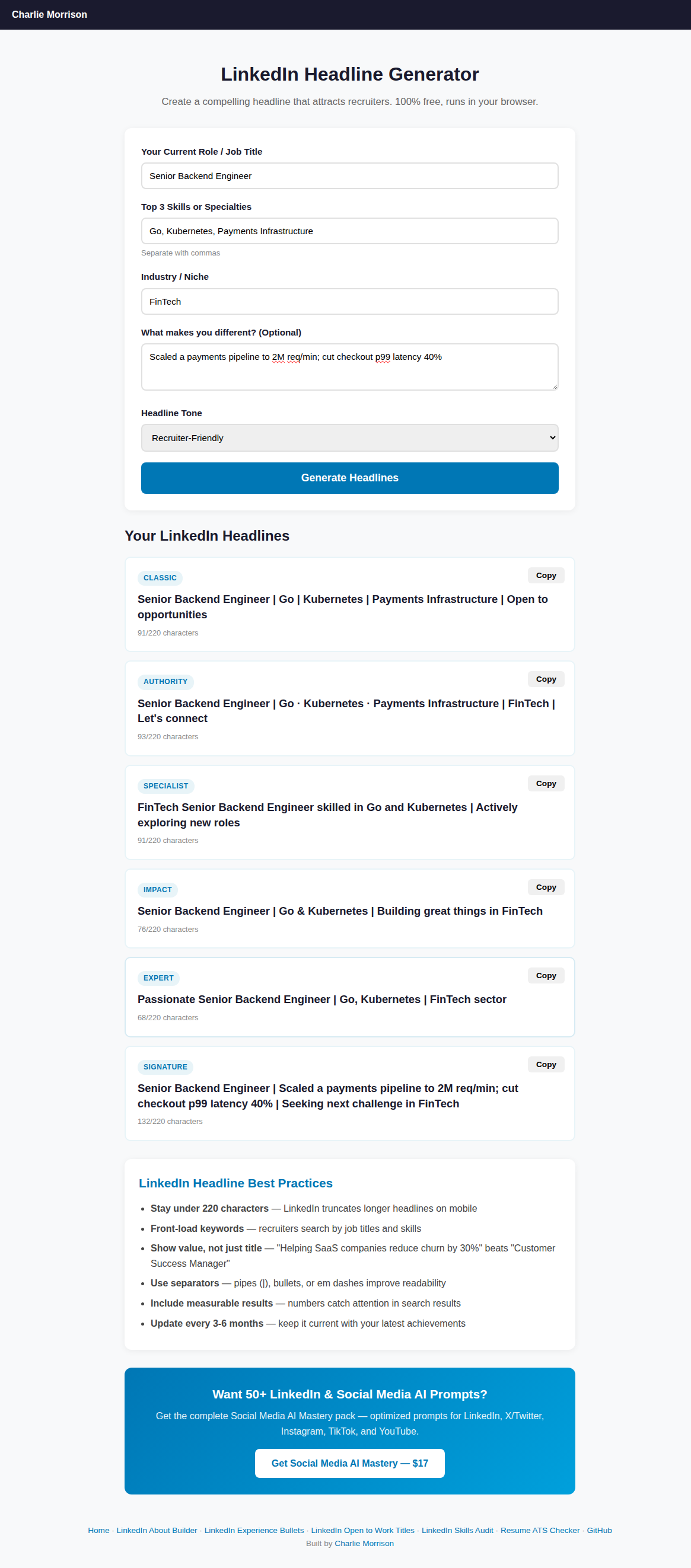
The headline generator set to “Recruiter-Friendly” tone — the “signature” variant front-loads the role and a concrete metric, which is what shows up in the invitation notification a recruiter actually reads.
The difference was the clearest single effect in the test. The same no-note request, sent from a profile whose headline led with “Senior Backend Engineer | scaled payments to 2M req/min” instead of a bare job title, was accepted noticeably more often — because the recruiter could instantly slot the person into a search they were already running. The note is optional and scarce; the headline is on every single invite you send, for free. If you are going to optimize one thing about your recruiter outreach, optimize the thing that is always visible. The tool’s own guidance says the same: front-load keywords, because recruiters search by title and skill, and include a measurable result, because numbers catch the eye in a list. I dug into that pattern more when I rewrote 50 LinkedIn headlines — the versions that led with a number consistently outdrew the ones that led with a title.
Result three: what the winning note actually looked like
The specific note won on reply rate by a wide margin — it was the only bucket that reliably turned an accept into a conversation. But “specific” is doing a lot of work, so here is the anatomy of the ones that got answers, all inside the 200-character limit:
- One real reason to connect — not “grow my network” but something true and checkable: a role they had posted, a company they recruit for, a talk or post of theirs. It proves you looked.
- One concrete credential — the same hard fact from the headline, compressed. “Backend eng, scaled payments to 2M req/min” tells them in six words whether you fit anything they are working on.
- A soft, low-pressure ask — “open to connecting if you work on backend roles” beats “please consider me for any openings.” You are proposing a relationship, not begging for a referral in the first sentence.
A note that hit all three read like a real person who had done ten seconds of homework, and recruiters answer real people. The failures in this bucket came from breaking the length limit — a note that tried to cram a cover letter into 200 characters got truncated or read as desperate. Short and specific beat long and specific every time.
Here is the full ranking from the forty requests:
| Approach | Accept rate | Reply rate | Verdict |
|---|---|---|---|
| Specific note (reason + credential + soft ask) | Strong | Best | Winner |
| No note + optimized headline | Best | Weak | Great for reach, needs a follow-up |
| No note + default headline | Solid | Weakest | Survivable but wasteful |
| Generic “let’s connect” note | Lowest | Poor | Worse than sending nothing |
Fix the headline recruiters see before you spend a note
The Job Search AI Toolkit bundles the LinkedIn tools with an ATS resume checker, keyword extractor, bullet writer, and cover-letter and salary scripts — so the profile behind every connection request is doing the persuading, and your five monthly notes go only where they count.
Get the Job Search AI Toolkit — $12The connection is the start, not the win
The biggest mistake underneath all of this is treating the accepted request as the finish line. It is the starting line. Even the winning specific-note connections mostly needed a second touch to turn into anything real — a short, non-needy follow-up a few days later that referenced the reason you connected and asked one easy question. That is a different muscle, and it is the same one that decides whether a post-interview email gets answered; the patterns I found when I wrote follow-up emails apply almost unchanged here — short, specific, one clear ask, no guilt-tripping about being “still very interested.”
It also matters that the profile a curious recruiter lands on after accepting actually holds up. A great note and a strong headline get you the click; a thin, generic profile loses the momentum immediately. Two things carried the most weight when recruiters looked closer: an About section that read like a person rather than a keyword dump — the difference I measured when I tested the LinkedIn About builder — and an unambiguous open-to-work signal so the recruiter is not guessing whether you are even looking. When I audited 40 open-to-work profiles, the ones that converted browsing recruiters into messages were the ones where the intent was obvious in the first three seconds.
What I actually do now
The forty requests collapsed into a short routine that respects the five-note limit and the one-second scan:
- Optimize the headline first. It is on every invitation whether you write a note or not. Lead with the role and one hard number, tuned for how recruiters search. This is the single edit that moves the most.
- For most connects, send no note — a clean profile with a strong headline gets accepted, and you keep your five monthly notes in reserve.
- Spend a note only when the person is worth one, and make it specific: one real reason, one concrete credential, one soft ask, under 200 characters. Never the generic template — it underperforms silence.
- Treat the accept as step one. Plan the short, specific follow-up before you send the request, because the conversation is the actual goal.
- Make the landing profile hold up — a human About section and a clear open-to-work signal — so the recruiter you finally got in front of does not bounce.
Common questions
Should you add a note to a LinkedIn connection request to a recruiter?
Only when the note is genuinely specific. In testing, a generic “I’d love to connect” note performed worse than sending no note at all — it reads as mass outreach and slightly lowers the accept rate. A specific note (one real reason, one concrete credential, one soft ask, under 200 characters) won clearly on reply rate. Free accounts also get only five personalized notes per month, so save them for people who are worth one and send a clean no-note request otherwise.
How many personalized connection notes can you send on LinkedIn for free?
Five per month on a free account, each capped at 200 characters, according to LinkedIn’s own help documentation. LinkedIn Premium removes the limit. Because notes are scarce on free, the smart move is to send most connection requests with no note (relying on a strong headline) and reserve your five notes for the highest-value recruiters with a genuinely specific message.
What matters more, the connection note or the profile headline?
The headline, for most requests. Your name, headline, and current role appear in the invitation notification whether or not you write a note, so they do the accepting-and-replying work by default. A headline that leads with your role and a concrete number was the single clearest accept-rate lift in the test. Optimize the headline first; it is always visible and costs nothing, unlike the five monthly notes.
What should a connection note to a recruiter actually say?
Keep it under 200 characters and include three things: one real, checkable reason to connect (a role they posted, a company they recruit for), one concrete credential compressed to a few words (“backend eng, scaled payments to 2M req/min”), and a soft, low-pressure ask (“open to connecting if you work on backend roles”). Avoid cramming a cover letter in — long notes get truncated or read as desperate. Short and specific beat long and specific.
The honest summary, after forty requests and two gates: “always personalize” is bad advice taken literally, because a generic personalization is worse than none. What actually works is treating your five monthly notes like the scarce resource they are, making the headline — the thing recruiters always see — carry the weight, and spending a real note only when a real reason and a real credential earn it. A connection is not the win. It is a door held open for one short, specific conversation, and everything above is just how to get that conversation started.
← More posts