PDF vs Word Resume: Which One Do ATS Systems Read?
If you have read more than two resume guides you have met the argument: send a PDF so the formatting never breaks versus send a Word doc so the robots can read it. Both sides say it with total confidence, and both quote the same vague authority: “the ATS.” I got tired of the theology, so I ran the test myself. I took one resume, made two versions of what an applicant-tracking system would actually pull out of the file, and fed both to the ATS score checker on this site. The result surprised me, and it changed how I answer this question — because my own tool gave the two versions the same score, and that identical number turned out to be the most useful thing in the whole experiment.
What the question is really asking
Here is the part almost every “PDF vs Word” article skips. An applicant-tracking system does not admire your file. It opens it, rips the text layer out of it, and throws away everything else — the fonts, the colors, the neat little icons, the layout. Then it tries to sort that raw text into sections it recognizes: contact, experience, education, skills. If you want the full definition of what that software does, the Wikipedia entry on applicant tracking systems lays out the parse-and-rank pipeline cleanly. The practical takeaway is that the file extension is almost never the thing that breaks. What breaks is the order the text comes out in.
And the single biggest cause of scrambled text is the two-column resume: the pretty template with a slim left rail for skills and contact details and a wide right column for experience. On the screen it looks organized. To a text extractor reading top to bottom, the two columns collapse into each other line by line. Your phone number ends up glued to your job summary. A skill lands in the middle of a bullet about latency. That damage happens the same way whether the file is a PDF or a Word doc — it is the layout, not the format. PDFs just get the blame because that is where people put their fanciest layouts.
The test: two extractions, one resume
I wrote a realistic senior-backend-engineer resume: a summary, one dated role with four achievement bullets, a skills line, and education. Then I made two text versions of it, the way an ATS would see each.
- The clean version — single column, top to bottom, exactly how a plain Word doc or a simple one-column PDF extracts. Headings sit above their content, bullets stay whole.
- The scrambled version — what you get when a two-column PDF is read by vertical position: the left-rail skills and the right-column experience interleave line by line.
Redisends up on the same line as a settlement-latency bullet. This is not me being unfair; it is the standard failure mode of column layouts, and you can reproduce it in ten seconds (I will show you how below).
I pasted each version into the free resume ATS checker on this site, with the same job description in the second box, and hit analyze. Here is the scrambled two-column extraction:
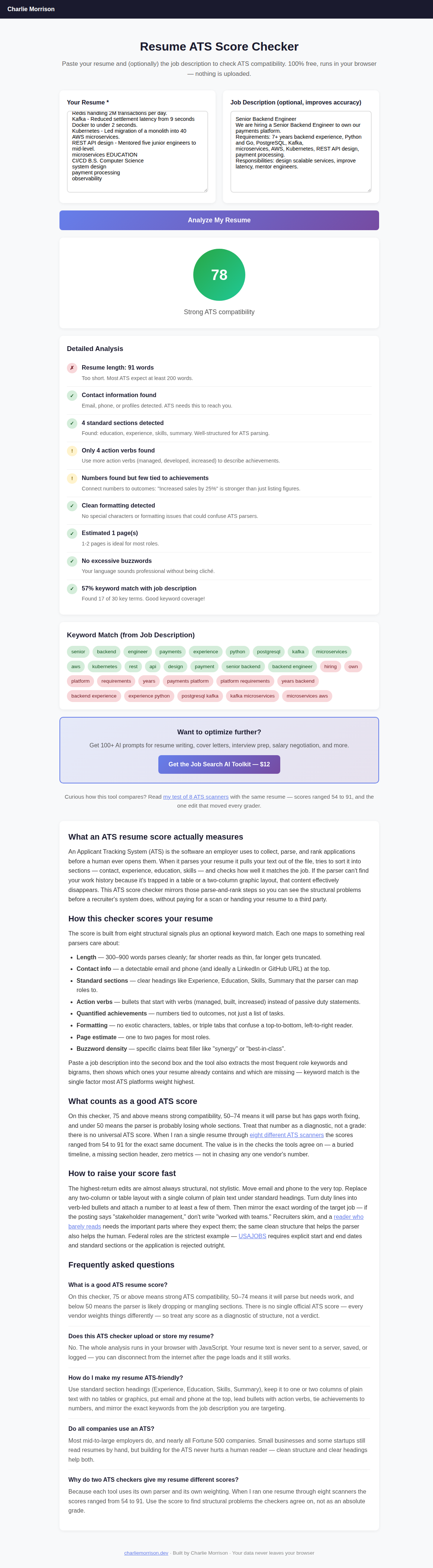
The scrambled two-column extraction, with skills and bullets fused into each other, still scored 78 and “Strong ATS compatibility.”
The surprising result: both scored 78
The clean version scored 78. The scrambled version, with contact details welded to sentences and skills scattered through the experience section, also scored 78. Same “4 standard sections detected.” Same 57% keyword match. Same “Strong ATS compatibility” badge. My own tool could not tell the difference between a resume a recruiter could read and one that had been through a paper shredder.
My first instinct was that the checker was broken. It is not. It is doing exactly what most free ATS checkers do, and understanding why is the actual lesson of this post.
A keyword-based checker searches for words. After a two-column scramble, all the words are still in the file — “experience,” “skills,” “Python,” “Kafka” — just in the wrong order. So the checker finds them and reports a healthy score. It never asks the harder question a real ATS asks: which company goes with which title, and which dates go with which job?
That harder question is where a column scramble actually hurts you. A real applicant-tracking system does not just count words; it maps fields. When your dates and titles have drifted into the wrong column, the system files “2021–2026” under the wrong employer, or fails to associate your skills with any role at all. The recruiter searches for “Kafka, 5+ years” and you do not surface — not because the word is missing, but because it is orphaned. A keyword checker, mine included, is blind to that.
So is PDF or Word actually safer in 2026?
With the layout myth cleared out, the format question gets a boring, honest answer: in 2026 the major systems accept both. Workday, Greenhouse, Lever, and the other big platforms parse .pdf and .docx text layers fine. The old “never send a PDF” rule dates back to a decade ago when many parsers genuinely choked on PDFs; it has aged into folklore. Harvard’s career office, in its resume guidance, tells students to keep the document simple and readable rather than fixating on the extension — because a clean single-column file survives either way.
There are only three real caveats, and none of them is the file type on its own:
- Follow the instructions. If the job posting says “.docx only” or the application form accepts only Word, send Word. A parser cannot rank a file it refused to accept.
- Never send an image-only or scanned PDF. If you exported to PDF from a design tool and the text is baked into a picture, there is no text layer to extract — the ATS gets nothing. This is the one case where “PDF” genuinely fails, and it fails hard.
- Kill the columns and tables. Whatever format you pick, use one column, standard headings, no text boxes, and no tables. That single change matters more than PDF-versus-Word ever will.
My default recommendation, when the posting does not specify: send a single-column .docx. It is the safest text layer, it re-opens cleanly on the recruiter’s end, and it sidesteps the image-only-PDF trap entirely. If you love your PDF, fine — just export it from a one-column source and check it before you send.
Test your own resume in ten seconds
You do not need a paid scanner to catch the failure that actually matters. You need a plain-text editor. Here is the exact check I use, and it is the practical payoff of the whole experiment:
- Open your finished resume — PDF or Word, does not matter.
- Select all, copy, and paste it into Notepad, TextEdit (in plain-text mode), or any blank text box — even the resume box on the checker.
- Read what lands. If it reads top to bottom, in order, with headings above their content and bullets intact, an ATS can read it too.
- If it comes out scrambled (skills fused to bullets, phone number mid-sentence, dates floating), your layout is the problem. Rebuild it in a single column and paste again.
That copy-paste test sees exactly what an extractor sees, and unlike a keyword score it cannot be fooled by a scramble, because you are reading the raw order with your own eyes. It is the one check I would run before sending any resume anywhere. Recruiters, remember, barely read the thing even when it parses perfectly — Nielsen Norman Group’s work on how little people actually read on screens is a good reminder that the important lines have to land where a skimming human expects them. A scramble buries them twice: once for the machine, once for the person.
Stop guessing at the format. Fix the whole resume.
The file type is the easy part. The Job Search AI Toolkit gives you 100+ prompts for rebuilding bullets into quantified achievements, tightening your summary into one clean column, and prepping the follow-up and interview messages that come next — the parts that move the score after the parser lets you in.
Get the Job Search AI Toolkit — $12The bottom line
The PDF-versus-Word war is mostly a distraction. When I forced the question through a real tool, the format did not move the score at all — and even a badly scrambled resume scored “Strong,” which tells you a keyword score is a smoke detector, not an inspector. The thing that decides whether a machine can route you forward is whether your text extracts in order, and the thing that wrecks that is a multi-column layout, in any format. Pick one column, standard headings, a real text layer. Send .docx when in doubt. Then do the ten-second copy-paste test with your own eyes, because that is the check the free scanners — mine included — quietly fail.
Frequently asked questions
Should a resume be a PDF or a Word document in 2026?
Either works with the major systems (Workday, Greenhouse, Lever) as long as the file has a real text layer and a simple layout. When the posting does not specify, I send a single-column .docx — it is the safest text layer and avoids the image-only-PDF trap. Always follow the posting’s stated format when it names one.
Do ATS systems actually read PDFs?
Yes, modern ones read the text layer of a normal PDF fine. The exception is an image-only or scanned PDF (text baked into a picture), which has no extractable text — the ATS gets nothing. Export from a text-based source, not a flattened image, and a PDF parses like any other file.
Why did the scrambled resume still score 78 on your checker?
Because that checker, like most free ones, searches for keywords, and after a two-column scramble all the words are still in the file, just out of order. It cannot see that dates drifted away from titles or skills detached from roles. A real ATS maps those fields positionally, which is where a column scramble actually costs you. Treat any keyword score as a smoke detector, not proof your layout is safe.
What resume layout is safest for an ATS?
One column, standard section headings (Experience, Education, Skills, Summary), no tables, no text boxes, no graphics, and contact details as plain text at the very top. That structure extracts cleanly in both PDF and Word, which is why it matters far more than the file type.
How can I check if my resume parses correctly?
Copy your finished resume and paste it into a plain-text editor or the box on a resume checker. If it reads top to bottom in order, an ATS can read it. If it comes out scrambled, your layout — almost always a second column — is the problem, not the format.
Related reading: I ran one resume through 8 ATS scanners (same file, scores from 54 to 91) and I collected 60 ATS rejection emails — both use the same “test the advice, do not repeat it” approach as this post. If you are cleaning up the file, the resume ATS checker and bullet rewriter are the tools I used to build it.
← More posts