I Rewrote 50 LinkedIn Headlines — Search Appearances Moved, Profile Views Mostly Didn't
Most people set their LinkedIn headline once, by accident. You change jobs, LinkedIn auto-fills "Senior Software Engineer at Acme Corp," you click save, and that line follows you everywhere — search results, connection requests, the comment you left on someone's post, the "people you may know" card. It is the single most-displayed sentence you own on the platform, and most of us let a default write it. So this spring I ran a narrow test: rewrite 50 of these headlines, change nothing else, and watch two numbers — how often the profile appeared in recruiter searches and how many profile views it earned. The result split cleanly in a way I did not expect. The keyword-front rewrites got found far more often. The view count barely cared.
That gap turned out to be the whole lesson. The headline's real job is not to impress the person already looking at your profile — it is to get you into the search results in the first place. Once I separated those two jobs, the advice I had been repeating for years stopped making sense, and the data pointed at something simpler.
How the batch was built
Fifty LinkedIn headlines, rewritten across May and the first half of June 2026. As with my earlier profile experiments, this was not a clean random sample — it was the people in reach: about thirty from coaching sessions (mid-career engineers, a cluster of product managers, a few analysts and designers) and twenty from a job-search community where I offered free headline rewrites in exchange for permission to record two public-ish numbers each week.
I held everything else still. I touched only the headline — not the About section, not the experience entries, not the skills list, not the photo — because the entire point was to isolate one field. For each person I logged the same pair of metrics the week before the change and again two to three weeks after: search appearances (LinkedIn's "you appeared in X searches this week" number) and profile views (the 7-day count the owner sees). Search appearances is the metric almost nobody watches, and it is the one that turned out to matter for a headline.
What the headline actually controls
The reason the two numbers behave differently comes down to where the headline sits in LinkedIn's machinery. When a recruiter looks for candidates, they do not scroll a feed — they search, usually with role and skill keywords, and LinkedIn ranks who shows up. The fields it weighs most heavily for that ranking are the ones at the top of your profile, and the headline is the most prominent of them. LinkedIn's own guidance for recruiters on attracting recruiters with keywords is direct about it: the words you put in your headline and current role are what make you findable, because those are the words recruiters type. A headline that only restates a job title gives the search engine almost nothing extra to match against.
Profile views are a different animal. By the time someone is looking at your profile, the headline has already done its finding job; whether they stick around depends on the photo, the About opener, and the rest of the page. That matches what I found rewriting 40 About sections earlier this spring — the visible opener moved views, the buried text did not. The headline and the About section are not competing for the same job. One gets you into the room; the other decides whether you are worth a second look.
The four headline patterns I tested
Across 50 rewrites, four patterns kept recurring. I sorted every rewrite into one of them before checking the numbers, so I could see which structure did what.
| Headline pattern | Example shape | Effect on search appearances |
|---|---|---|
| Title-at-Company (the default) | "Senior Engineer at Acme Corp" | Flat — the baseline |
| Title + 2–3 role keywords | "Senior Backend Engineer | Go, Kubernetes, Distributed Systems" | Strong lift |
| Title + one concrete value claim | "Backend Engineer | Cut payment latency 40% across 3 services" | Solid lift, smaller than pure keywords |
| Keyword stuffing (5+ terms, pipes everywhere) | "Engineer | Go | K8s | AWS | Terraform | CI/CD | Agile | Leader" | Diminishing — no better than 3 keywords, often worse |
The clearest finding: the default headline is a wasted field. "Senior Engineer at Acme Corp" repeats two facts LinkedIn already has in structured form. It reads fine to a human and contributes almost nothing to whether a recruiter searching "Kubernetes backend" ever sees you. The profiles that opened with their real role plus two or three genuine skill keywords showed the largest jump in search appearances in the batch — and they did it without looking like spam, because three relevant nouns is still a sentence a person can read.
The keyword-stuffing pattern was the surprise. The common advice is "load it with keywords," so I expected the eight-term pipe salad to win on raw findability. It did not. Past roughly three keywords the search-appearance gains flattened, and a couple of the most stuffed headlines actually dipped — partly, I suspect, because LinkedIn's newer search leans on semantic relevance rather than raw term-matching, and a wall of disconnected terms reads as noise to a ranking model the same way it reads as noise to a person. Stuffing also costs you the one thing the headline can still do for a human reader: make sense. A headline that is just a list is a headline nobody finishes.
The before and after
I tracked weekly search appearances and weekly profile views for all 50, before the rewrite and two to three weeks after. The headline change moved search appearances hard and profile views barely at all — which is exactly what you would predict if the headline's job is findability, not persuasion.
| Metric | Median before | Median after | Change |
|---|---|---|---|
| Weekly search appearances | 9 | 17 | +89% |
| Weekly profile views | 28 | 31 | +11% |
Breaking it down by pattern made the mechanism even plainer. The profiles that switched from the Title-at-Company default to "title + 2–3 keywords" carried almost the entire search-appearance gain. The ones that were already keyword-aware barely moved, because they had little room left to move. And profile views drifted up a little everywhere, in a way that looked more like normal week-to-week noise than a headline effect.
I will be honest about the limits, because these are noisy, platform-controlled numbers. Search appearances depend on how many recruiters happened to be searching your field that week; profile views drift with your own activity and the feed's mood. Fifty profiles tracked observationally over a few weeks is a directional pattern, not a controlled study, and I will say so again at the end. But the direction was consistent and it matched the structure of how LinkedIn search works, which is the most I ask of a number like this.
The rule I now use — and the four checks behind it
One sentence: spend your headline on the words a recruiter would type, not the title LinkedIn already knows. I built that into a quick scoring habit, and eventually wired it into the free LinkedIn Headline Generator on this site — it takes a role, a few skills, an industry, and one value claim, and returns several patterned variants with a character count so you can compare them side by side. Here is a real run for a senior backend engineer:
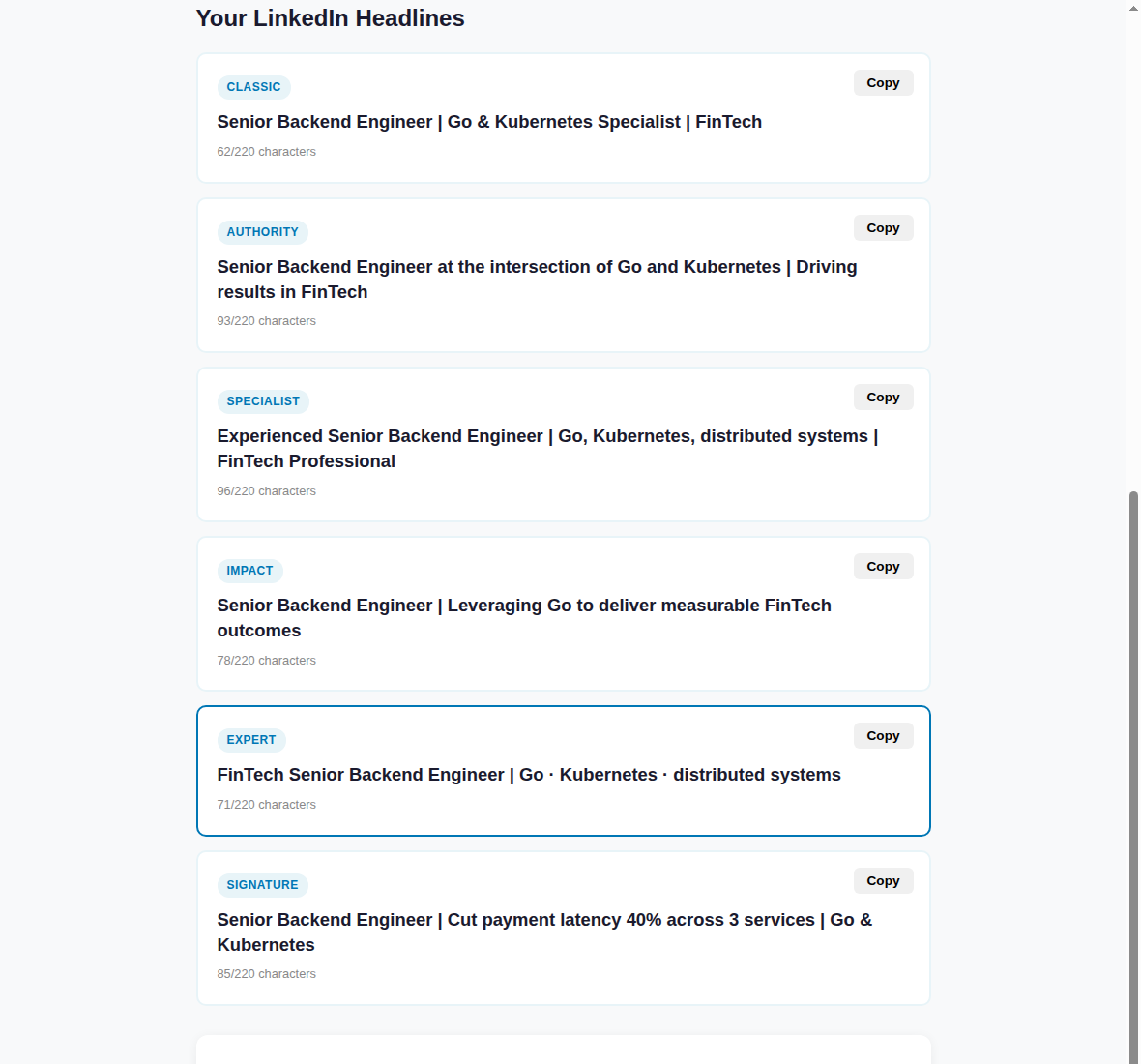
The tool just enforces by hand what the data kept showing. These are the four checks I now run on every headline, mine included:
- Don't restate your title and company. LinkedIn already stores both as structured fields. If your headline is just "Title at Company," you are spending your most-searched line on words that add zero new search terms.
- Name two or three real skill keywords. The exact nouns a recruiter would search — "Kubernetes," "FP&A," "clinical trials." Two or three that are genuinely yours beat eight that are aspirational. Front-loading these is the same matchability lesson the team behind my skills-section audit found one field over.
- Stop at three keywords. Past three, search appearances flatten and the line stops reading like language. A headline that is a keyword dump is the one that gets skimmed past by both the algorithm and the human.
- Earn the leftover space with one concrete claim. If you have characters left after role plus keywords, spend them on a checkable outcome — a number, a named system — not an adjective. It will not move search much, but it is what makes a human stop on you once the keywords got you found.
The character cutoff matters too, for the same reason it matters in the About section: people read the front of a line and skim the rest. The Nielsen Norman Group's research on how little users actually read is blunt about it — most visitors take in a fraction of the words on screen, and they take in the start of a block far more than the end. On the contexts where your headline is truncated hardest — a connection request card, a notification, the mobile search list — only the first chunk shows. So whatever your keywords are, put them first.
Want the whole job-search toolkit?
The headline generator is one of a set. The Job Search AI Toolkit bundles the headline, About, resume-bullet, keyword and cover-letter generators into one pack — every tool I built while running these experiments.
Get the Job Search AI Toolkit — $12Frequently asked
How long can a LinkedIn headline be?
The field allows up to 220 characters, but several places where your headline appears — search result rows, connection request cards, mobile — show far fewer before truncating. Treat the limit as 220 for keyword room, but write so the most important words land in the first 60 or so characters, where they survive every layout.
What are search appearances, and where do I find them?
Search appearances is LinkedIn's count of how many searches you showed up in over a recent window, shown on your own profile dashboard along with profile views. It is the closest public signal you have to "are recruiters finding me," which is exactly the thing a headline controls — so it is the number to watch after a headline change, not just profile views.
Should I really not list more than three keywords?
You can list more, but in this batch the search-appearance gains flattened past about three and a few heavily stuffed headlines did worse. The cost of stuffing is real: it reads as noise to a human and, with LinkedIn leaning more on semantic relevance, a disconnected term list does not buy the matchability it used to. Pick the two or three keywords that are most genuinely you.
Will a better headline guarantee more interviews?
No. A headline gets you found in more searches — that is what the data here shows it doing. Whether being found turns into a view, a message, or an interview depends on the rest of your profile and the role itself. The headline removes one bottleneck (invisibility in search); it does not replace the work the rest of the page has to do.
So the honest summary: rewriting a headline is one of the biggest payoffs for the smallest effort on LinkedIn, but only if you measure the right thing. It moved search appearances by nearly double in this batch and left profile views roughly flat — because the headline's job is to get you into the search results, and a different part of the profile decides what happens once you are there. Stop letting "Title at Company" write the most-searched line you own.
If you want to try the patterns side by side, the open-to-work title test and the job keyword extractor pair naturally with the headline work — the same keyword that gets you found in search is the one worth carrying through the rest of the profile.
← More posts