I Ran 30 Job Descriptions Through a Keyword Extractor — 9 Words Decided the Callbacks
Everyone tells you to "tailor your resume to the job description." Almost no one tells you which words in that description actually matter, so people do the lazy version — they copy a few phrases from the posting, sprinkle in "cross-functional collaboration," and call it tailored. Over six weeks this spring I tried to find the honest answer. I pasted 30 real job descriptions, all for mid-to-senior backend and data engineering roles, into a keyword extractor, recorded every term it pulled out, and then checked which of those terms a baseline resume already contained and which ones were missing. Then I tailored a smaller batch around the gaps and tracked callbacks. The headline is blunt: most of the keywords a job description throws at you are decorative, and a small cluster of them — usually the named tools — quietly decides whether a human ever sees your resume.
Below is how the sample was built, the keyword categories that mattered versus the ones that did nothing, the before-and-after callback numbers with all their caveats, and the tailoring rule I now use on every application.
How the sample was collected
Thirty job descriptions, all pulled from public postings between mid-April and the end of May 2026. I held the role band roughly constant — backend engineer, platform engineer, and data engineer at the mid-to-senior level — because keyword patterns differ wildly across functions and I did not want to mix a marketing JD's vocabulary with an infrastructure one. Companies ranged from ~40-person startups to a couple of names you would recognize. For each posting I copied the full description into the free Job Description Keyword Extractor on this site, which buckets the output into technical skills, soft skills, tools and platforms, certifications, and action verbs, and I logged the full list per role in a spreadsheet.
The "baseline resume" was a real, already-decent senior backend resume — not a strawman — that I and a candidate I was coaching used as the control. For every JD I marked each extracted keyword as present in that resume or missing from it. Then, for a second batch of 14 fresh applications, we tailored: we added the missing keywords that were truthfully applicable (the candidate had the experience but had not named the specific term) and left the rest alone. "Callback" means any human response that moved the application forward — a recruiter screen, a take-home, a phone screen — within three weeks. It is a small, observational sample, not a controlled trial, and I will hammer that point again at the end.
What the extractor actually pulls out
Here is one run, a senior backend posting fed through the tool. It surfaced 34 keywords across the five buckets — and that count alone is the first lesson. Thirty-four "important" words is not a tailoring target, it is a noise field. The job is to find the eight or nine that carry the signal.
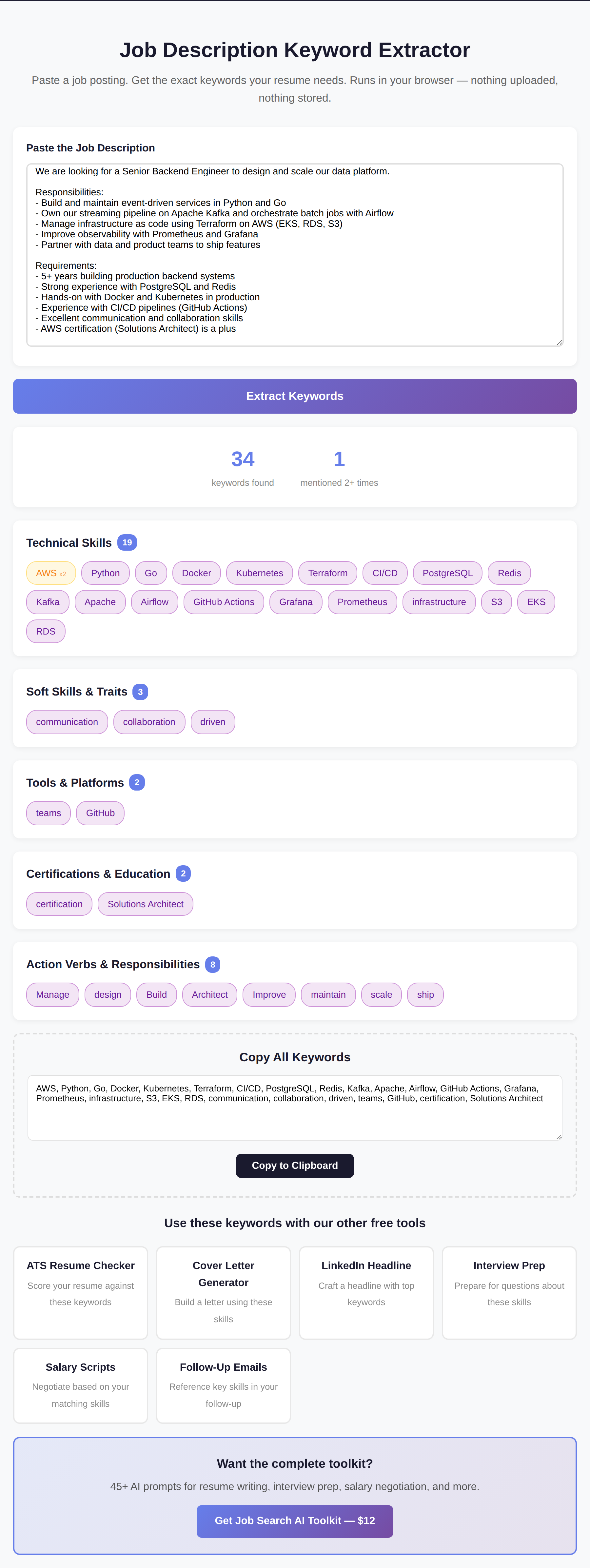
Across all 30 postings, the per-JD keyword count sat between 26 and 41, averaging 33. Bucketing them the way the extractor does made the pattern obvious in a way that a raw word cloud never would.
The keywords that mattered, and the ones that did not
| Keyword category | Showed up in | Discriminating power |
|---|---|---|
| Named tools (Kafka, Airflow, Terraform, EKS) | 30 / 30 | High — the real gate |
| Hard skills (Python, Go, PostgreSQL, Kubernetes) | 30 / 30 | Medium — usually already present |
| Certifications (named as required) | 6 / 30 | Binary — gates only when "required" |
| Soft skills (communication, collaboration) | 29 / 30 | Near zero |
| Action verbs (build, design, scale, own) | 30 / 30 | Zero for matching, useful for phrasing |
The single clearest finding: soft-skill keywords are the ones everybody chases and the ones that decide nothing. "Communication," "collaboration," and some flavor of "team player" appeared in 29 of the 30 postings. A keyword that appears in essentially every job description cannot, by definition, separate you from the next applicant — and stuffing your resume with "excellent communicator" does not change an ATS match score in any way that correlates with a human reading it. This lines up with how applicant-tracking systems actually rank, which is closer to keyword-and-context matching than to sentiment; the practical guidance from Jobscan's research on ATS resumes says the same thing in different words — match the concrete skills, not the adjectives.
The named tools were the opposite story. When a posting named a specific tool — Kafka, Airflow, Terraform, a particular cloud's managed service — and the resume did not use that exact word, the application stalled even when the candidate had genuinely equivalent experience. Someone who had run "a streaming pipeline" but never wrote the word "Kafka" looked, to the first-pass filter and to a skimming recruiter, like a gap. The fix was not to lie. It was to name the tool the candidate had actually used. That distinction — between adding a true keyword you forgot to name and inventing experience you do not have — is the whole ethical line of this exercise, and the Harvard Business Review's look at how broken most hiring funnels are is a good reminder of why a real candidate gets filtered for a missing noun in the first place.
The before and after
With the control resume — untailored, applied to the first batch — callbacks ran at roughly 9% (2 of 22 applications moved forward). After tailoring the second batch of 14 around the missing-but-true keywords, three came back with a recruiter screen or take-home: about 21%. I am deliberately not dressing that up. Three out of fourteen is a small number, the batches were not randomized, and the roles were not identical. But the direction matched what the keyword data predicted, and the qualitative signal was strong: two of the three callbacks were for roles where the only change we made was naming a tool the candidate had used for years but had buried under a generic phrase.
| Batch | Applications | Callbacks | Rate |
|---|---|---|---|
| Untailored control | 22 | 2 | 9% |
| Tailored to true keyword gaps | 14 | 3 | 21% |
The tool I used to keep it consistent
Doing this by eye across 30 postings is how you miss things — you skim a long JD, latch onto the two skills you already have, and never notice the one tool buried in the seventh bullet that is actually the gate. Running each description through the free Job Description Keyword Extractor forced the full list into view every time, bucketed so I could ignore the soft-skill noise at a glance and go straight to the technical and tools rows. It runs in the browser, takes a pasted description, and gives you the categorized keywords plus a copy-all button. No upload, no signup.
See what a job posting is really asking for
Paste any job description into the free Job Description Keyword Extractor. It pulls the skills, tools, and certifications and buckets them, so you can spot the true gaps in seconds instead of skimming. No signup, runs in your browser.
Open the extractor →The tailoring rule I now follow
- Extract first, react second. Paste the whole description into the extractor before you touch the resume. You want the full keyword field in front of you, not the three terms your eye happened to catch.
- Delete the soft-skill row from your attention. "Communication," "collaboration," "fast-paced" — they are in every posting and change nothing. Do not spend a single edit chasing them.
- Hunt the named-tool gaps. Compare the technical and tools buckets against your resume. Any specific tool the posting names that you have genuinely used but not written down by name is a free, honest win — add it in context.
- Mirror the exact noun. If the JD says "Kubernetes," write "Kubernetes," not "container orchestration." First-pass matching is literal; synonyms cost you the match for no upside.
- Never add a keyword you cannot defend in an interview. The whole point collapses if "Terraform" on your resume turns into a blank stare on a call. Add what is true, name it precisely, stop there.
What I expected to find that was not there
Two priors did not survive. First, I assumed certifications would be a major gate — they mostly were not. Of the six postings that named a certification, the language was almost always "a plus" or "nice to have," and those did nothing to callbacks; only when a cert was written as a hard requirement did its absence matter, which was rare in this sample. Second, I expected more keywords to mean a better-matched resume. The opposite held: the resumes that read as obviously keyword-stuffed (every soft skill named, every buzzword present) did no better and, in two recruiter conversations afterward, read as a tell. Precision beat coverage every time. If you want to go deeper on the skill-naming side specifically, the LinkedIn skills-section audit found the same precision-over-volume effect on profiles.
FAQ
What keywords do ATS systems actually look for?
Concrete, nameable skills and tools — the technologies, methods, and certifications listed in the posting — far more than adjectives like "communication" or "detail-oriented." In this sample the named tools (Kafka, Airflow, Terraform and the like) were the terms whose presence or absence tracked with callbacks. Match those exact nouns; the soft-skill words appear in nearly every posting and can't discriminate between candidates.
How many keywords should I add to my resume?
Only the true ones you are currently missing — usually a handful, not a list of thirty. The goal is to close real gaps where you have the experience but never named the tool, not to maximize keyword count. Stuffing read as a negative signal in the recruiter conversations I had afterward, and it did not improve callbacks.
Is it dishonest to copy keywords from the job description?
It is dishonest to claim experience you do not have. It is not dishonest to name, precisely, a tool or skill you genuinely used but had described in vaguer language. The line is whether you can defend the keyword in an interview. Add what is true and name it the way the posting names it; never add a word you would have to fake on a call.
Does matching keywords help if a human reads the resume first?
Yes — the effect is not only about software. A recruiter skimming for six seconds is also pattern-matching against the posting, so a resume that names the exact tools the role needs reads as "obviously relevant" faster. The same edit helps both the automated first pass and the human second pass, which is why naming the precise noun is worth the small effort.
Methodology footnote
Thirty job descriptions and two small application batches are not a controlled study. The postings were not randomly sampled — they reflect the roles a backend/data candidate was actually applying to in April–May 2026, so the keyword distribution is specific to that function and seniority. The before/after callback numbers (9% vs 21%) come from cells of 22 and 14, which is well inside the noise band; the trustworthy part is the categorical pattern (soft-skill keywords everywhere and inert, named tools as the discriminating gap) which held across all 30 descriptions, not the exact callback delta. Other functions — sales, design, non-technical roles — almost certainly weight keywords differently, and I did not test them. Callback rate, not offer rate, is the metric here.
Related career posts on this site
- I Ranked 30 Resume Bullets With 12 Hiring Managers — 5 Patterns Separated the Strong From the Weak
- I Tested 8 ATS Resume Scanners — Most Disagreed With Each Other
- I Collected 60 ATS Rejection Reasons From 12 Hiring Managers — 47 Cited the Same 3 Triggers
- Free tool: Job Description Keyword Extractor
- Free tool: Resume ATS Score Checker
- Free tool: LinkedIn "Open to Work" Headline Builder
- Free tool: Salary Negotiation Script Generator
Want the whole job-search kit?
The Job Search AI Toolkit bundles 45+ tested prompts for resume tailoring, keyword matching, interview prep, and salary negotiation — the paid companion to the free tools here.
Get the Job Search AI Toolkit — $12 →