I Generated a Month of LinkedIn Posts With a Free Tool — Here's What LinkedIn Rewards (and Where the AI Is Wrong)
Most founders treat LinkedIn the way they treat flossing: they know they should, they do it hard for four days, and then they vanish for a month. When they do post, it is usually a launch announcement or a "we're hiring" note, because those are the only two things urgent enough to overcome the blank box. The result is a feed that looks like a company answering machine, and the algorithm treats it exactly that way.
I wanted to see whether a machine could fix the discipline problem without me hiring a social manager. So I took a free content calendar generator I built and put on this site, froze one realistic case, and read every single post it planned for a month on LinkedIn specifically. LinkedIn is not Instagram with a suit on. The things that get reach here are different, so the interesting question was not "does the tool produce a calendar" — it obviously does — but "how much of what it produced would actually survive contact with the LinkedIn algorithm, and where would I have to override it by hand?"
The case I froze
I ran the generator as a solo SaaS founder: niche set to SaaS / tech product, platform LinkedIn, five posts a week, four weeks. That is twenty posts. I picked five-a-week on purpose because it is the cadence a real founder can sustain between shipping and support, and it is also the cadence LinkedIn rewards — industry trend reports consistently find that accounts posting three to five times a week see roughly double the engagement of sporadic posters.
The tool spat out the month in about a second. Here is the mix it chose without being told any rule: thirty percent Educate, fifteen percent Engage, fifteen percent Behind the scenes, fifteen percent Inspire, fifteen percent Promote, ten percent Social proof. Promotion is the smallest slice by design. That alone puts it ahead of ninety percent of founder feeds, which are basically all Promote.
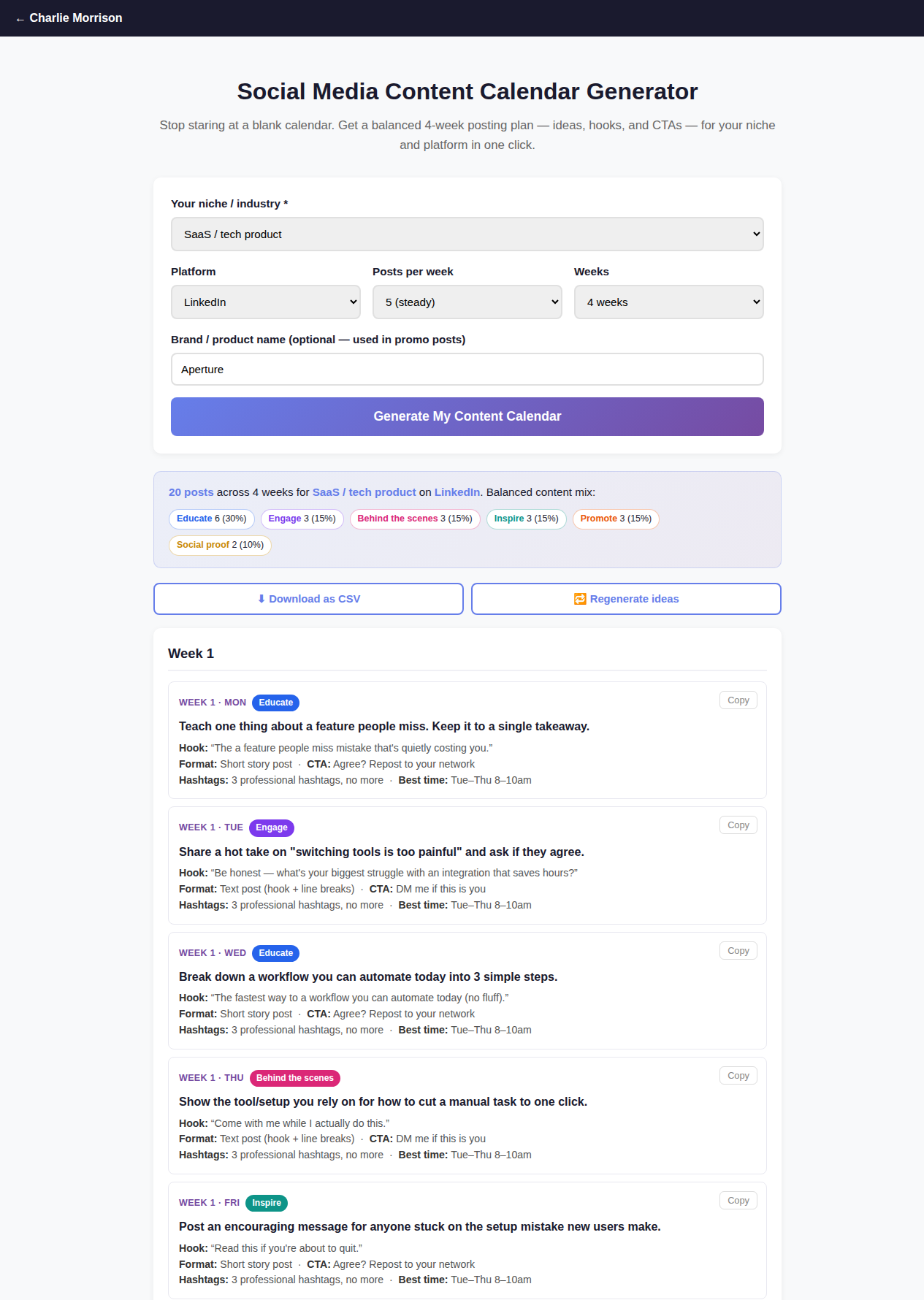
The raw output: 20 LinkedIn posts, a balanced pillar mix, and per-post hook + format + hashtag guidance — generated in about a second. The screenshot is my own run.
What it got right for LinkedIn
Three things surprised me, because generic "social media" tools usually get LinkedIn wrong by treating it like a visual-first network.
First, the hashtag guidance. Every post carried the same note: three professional hashtags, no more. That is not a lazy default — it is correct. Sprout Social's current guidance is three to five relevant hashtags, and the platform now rewards specificity over volume; ten generic tags reads as spam and dilutes rather than helps. The tool defaulting to a tight three is the right instinct for LinkedIn.
Second, the formats. The generator leaned on text posts, short story posts, and document/carousel PDFs, and it kept flashy video out of the default. That tracks with how LinkedIn distributes content right now: Buffer's breakdown of the LinkedIn algorithm puts carousels and documents among the highest-engagement formats on the platform, precisely because they hold people on the post longer. Which brings up the metric that actually governs everything here.
Third, the cadence and the value-first ratio. Five posts a week with promotion held to a minority is the shape of an account that grows. It resists the founder instinct to sell every day.
Where it is wrong — the three overrides
Here is the honest part. The calendar is a skeleton, not a finished feed, and on LinkedIn there are three places where shipping the raw output would actively cost you reach.
Override one: rewrite every hook by hand, because the first line is the algorithm. The tool builds each hook by slotting your topic into a template, and on LinkedIn that produces grammatical wreckage. Two real examples from my run, copied verbatim off the screen: "The a feature people miss mistake that's quietly costing you." And: "The fastest way to a workflow you can automate today (no fluff)." Nobody reads past that. This matters more on LinkedIn than anywhere else because the platform truncates your post after the first two or three lines with a "see more" button, and that first line decides whether anyone expands it. Sprout Social's algorithm breakdown is blunt about it: the opening lines are the highest-leverage real estate you have, because the metric LinkedIn optimizes for now is dwell time — the seconds a person actually spends on your post. A broken hook gets a sub-three-second glance, which the algorithm reads as a bounce and quietly buries. So the tool's job is to hand you the topic and the angle; your job is to write a first line a human would stop for. That is fifteen minutes across twenty posts, not fifteen minutes each.
Override two: kill the "DM me" and "repost this" calls to action. The generator sprinkled CTAs like "DM me if this is you" and "Agree? Repost to your network." Those are engagement-bait reflexes carried over from other platforms, and LinkedIn has spent the last two years down-weighting exactly that. What earns distribution now is a substantive comment — someone typing a real sentence — because comments drive dwell time for every person who reads the thread. Swap the bait for a genuine question the post has actually earned. "What's the one integration you wish existed?" beats "DM me if this is you" every time, and it does not make you look like you are farming.
Override three: for a small or cold audience, dial promotion down and cut the polls. Fifteen percent promotion is a healthy steady-state ratio, but a founder with a few hundred followers has not earned the right to sell one post in seven yet. Early on I would push promotion closer to five or ten percent and let proof and teaching carry the account until there is an audience to convert. And I would delete most of the polls the tool scattered in — polls farm a cheap tap, but a tap is a two-second interaction, and two-second interactions are the opposite of the dwell time you are trying to build. Keep the carousels and documents; drop the polls.
One post, before and after
To make the overrides concrete, here is the first Monday of my generated month, exactly as the tool produced it, then the version I would actually publish.
The raw output: pillar Educate, idea "teach one thing about a feature people miss," hook "The a feature people miss mistake that's quietly costing you," format short story post, CTA "Agree? Repost to your network." The idea is fine. Everything wrapped around it needs work.
The rewrite: same idea, but the hook becomes a first line a person stops for — "Ninety percent of our users never touch the one feature that would save them the most time. Here's why, and how to find yours." The format stays a short text post with line breaks so it reads easily on mobile. The CTA turns into an earned question: "What's a feature in a tool you love that you only discovered by accident?" Same skeleton, same slot in the calendar, but now the first line survives the "see more" cut and the ending invites a real comment instead of a reflexive repost. That is the entire difference between a post that gets forty impressions and one that gets four thousand, and the tool cannot do it for you — it can only make sure the slot exists so you are not staring at an empty Monday.
The workflow that actually works
After the experiment, the way I would use a tool like this is not "generate and post." It is "generate the skeleton, override the three things, then batch." The machine solves the problem it is genuinely good at — the blank calendar, the discipline, the balanced mix so you are not accidentally selling every day. It does not solve the problem of sounding like a person who is worth reading. That part is still yours, and on LinkedIn it is the whole game.
Run the generator, get your twenty slots with a topic and a format for each, then spend one focused session rewriting the hooks, fixing the CTAs into real questions, and thinning the promo. You walk away with a month of LinkedIn content that has a spine and a voice, in about the time it takes to write two good posts from scratch.
Want the whole year already written?
The 2026 Social Media Content Calendar bundles a full year of balanced post prompts plus 110 fill-in-the-blank caption templates — the skeleton done, so all you add is the hook and your voice. Works for LinkedIn, Instagram, and the rest.
Get the 2026 Content Calendar — $17FAQ
How many times a week should a founder post on LinkedIn?
Three to five times a week is the sweet spot most trend reports land on — enough that the algorithm sees you as consistent, few enough that you can keep it up for months without burning out. What kills accounts is not low volume, it is the stop-start pattern: five posts one week, then silence for three. Pick a cadence you can sustain and plan it in advance so you are never deciding what to post on the day.
Does a generated content calendar actually work for LinkedIn?
For the skeleton, yes; for the finished post, no. A generator solves the blank-calendar problem and enforces a balanced mix so you are not selling every day. But it builds hooks from templates, and LinkedIn punishes weak first lines harder than any other platform because it truncates your post at the "see more" cut. Use the tool for the topic, format, and slot, then rewrite the hook and CTA by hand.
How many hashtags should I put on a LinkedIn post?
Three to five relevant ones. Sprout Social's guidance and current LinkedIn behavior both point the same way: specificity beats volume, and stuffing ten generic tags reads as spam and can suppress reach rather than extend it. Mix one or two broad industry tags with a couple of niche ones tied to the actual post.
Related reading: I ran the same tool for a month of Instagram posts and checked the mix against the rule of thirds, rounded up the AI content-creation tools worth using in 2026, and the free social media AI helper here drafts the captions once you know what you are posting. Same rule throughout: plan the mix first, write the hook like a human, sell second.
← More posts