I Applied to 40 Jobs: Easy Apply vs Company Site — Where the Replies Actually Came From
There is a permanent argument in every job-search forum: should you use LinkedIn's one-click Easy Apply, or should you go to the company's own careers page and fill out the real form? One camp says Easy Apply is a black hole that drops your resume into a pile of 900. The other says the company site is a waste of fifteen minutes per application that nobody reads anyway. Both sides argue from feeling, because almost nobody tracks which channel actually got them a human reply. So over three weeks this spring I sent 40 applications, split evenly between the two channels, and logged every single response. The headline gap was real — but it pointed at something other than the channel, and once I saw it the whole debate looked like the wrong question.
How the test was built
I kept the variables tight so the comparison would mean something. Every application was for a senior backend or platform engineering role, all remote or hybrid, all posted within the previous ten days (stale postings are a known reply-killer and I did not want that noise). I alternated channels strictly: odd-numbered roles went through LinkedIn or Indeed Easy Apply, even-numbered roles went through the company's own careers page — usually a Greenhouse, Lever, or Workday form. Same base resume, same week, same me.
I counted a "reply" as any response from a human: a recruiter screen invite, a "tell me more about your payments experience" email, or even a rejection that referenced something specific in my application. I deliberately included specific rejections, because a templated auto-reject tells you nothing, but a rejection that quotes your background means a person actually opened the file. Three weeks is enough to catch the fast-moving teams and miss the slow ones, so treat the absolute numbers as a snapshot, not a law of physics. The shape is what held up.
The headline numbers
Here is the channel split, straight off my tracking sheet:
| Channel | Sent | Human replies | Recruiter screens | Reply rate |
|---|---|---|---|---|
| Easy Apply (LinkedIn / Indeed) | 20 | 3 | 1 | 15% |
| Company career site | 20 | 6 | 4 | 30% |
40 applications over three weeks, May 2026, senior backend / platform roles.
So the company site doubled the reply rate and quadrupled the recruiter screens. If you stop reading here you would conclude "always use the company site," and a lot of advice does stop exactly here. But that conclusion ignores the cost on the other side of the ledger, and it ignores a second column I was tracking that turned out to matter more.
The cost first. An Easy Apply submission took me about 90 seconds — confirm the resume, answer two or three screening questions, done. A company-site application averaged closer to 14 minutes: create yet another account, watch a Workday parser mangle my resume into empty fields, retype half of it by hand, answer the "describe a time you…" boxes. Twenty company-site applications ate roughly four and a half hours. Twenty Easy Applies ate half an hour. If your only goal is raw reply count per hour of effort, the gap closes fast — and that is before the second column.
The column that actually predicted replies
Next to "channel," I had logged whether I tailored each application — meaning I rewrote the resume summary line and made sure the five to eight skills the posting emphasized appeared, in the posting's exact wording, somewhere in my resume. Not lying, not stuffing; just making the words match the words a recruiter and their software would search for. When I re-sorted the same 40 applications by that column instead of by channel, the picture changed completely:
| Group | Sent | Human replies | Reply rate |
|---|---|---|---|
| Tailored to the posting | 14 | 7 | 50% |
| Sent as-is (generic resume) | 26 | 2 | 8% |
Same 40 applications, re-sorted by whether I tailored the resume to the posting.
Tailoring beat not-tailoring by roughly six to one, and that gap dwarfed the channel gap. The channel comparison was real, but it was mostly measuring tailoring in disguise — because of where the tailored applications happened to land. When I cross-tabbed the two columns, the trick became obvious:
- Easy Apply: I tailored only 4 of 20. The friction is so low that I clicked through 16 of them on autopilot with a generic resume. Of the 4 tailored, 2 got replies; of the 16 generic, 1 did.
- Company site: I tailored 10 of 20. Sitting through a 14-minute form puts you in a frame of mind where you actually read the posting and adjust. Of the 10 tailored, 5 replied; of the 10 generic, 1 did.
Read the company-site advantage again with that in mind. The careers page did not have some magic recruiter hotline that Easy Apply lacks. It just forced me to slow down, and slowing down is what made me tailor. The channel was a proxy for effort. The friction I was cursing the whole time was quietly doing the one thing that worked.
Why matching the words does so much work
The mechanism is not mysterious. Most mid-to-large companies route applications through an applicant tracking system, and the first pass — whether automated or a recruiter skimming a list — ranks candidates on how well the resume matches the requisition's language. Purdue's writing lab is blunt about this in its guidance on resumes: a resume is a targeted document, and the closer it speaks the employer's own terms back to them, the better it travels through screening. A generic resume that says "built scalable services" when the posting asks for "Kubernetes," "Kafka," and "PCI-DSS" gives the ranker almost nothing to grab.
And recruiters do not read; they scan. The Nielsen Norman Group's long-running research on how little users actually read applies to a resume in a stack just as much as to a web page — the first scan is a hunt for matching keywords, and only the resumes that survive that hunt get read like prose. Tailoring is just making sure your resume wins the scan it is actually subjected to, instead of the careful read you wish it got. I saw the same lesson when I sent 30 cover letters split between personalized and template — the personalization gap was real, but a concrete, specific opening line did far more than generic effort, for the same reason: it gave the reader something precise to latch onto in the two seconds they spent.
So tailor — but make it cost 30 seconds, not 14 minutes
The obvious objection: if tailoring is the lever, and the company site makes you tailor, just use the company site, right? No — because the 14 minutes of Workday data entry was never the part that helped. The retyping is dead weight; the tailoring is the live wire. The win is to keep the tailoring and throw away the friction: use Easy Apply for its speed, but spend 30 of those saved seconds pulling the posting's real keywords first.
That is the gap I built a free tool for. The Job Description Keyword Extractor takes the full posting, finds the technical skills and action verbs it actually emphasizes, and hands them back as a checklist you can match your resume against before you click apply. Here is a real run on one of the senior-backend postings from this batch:
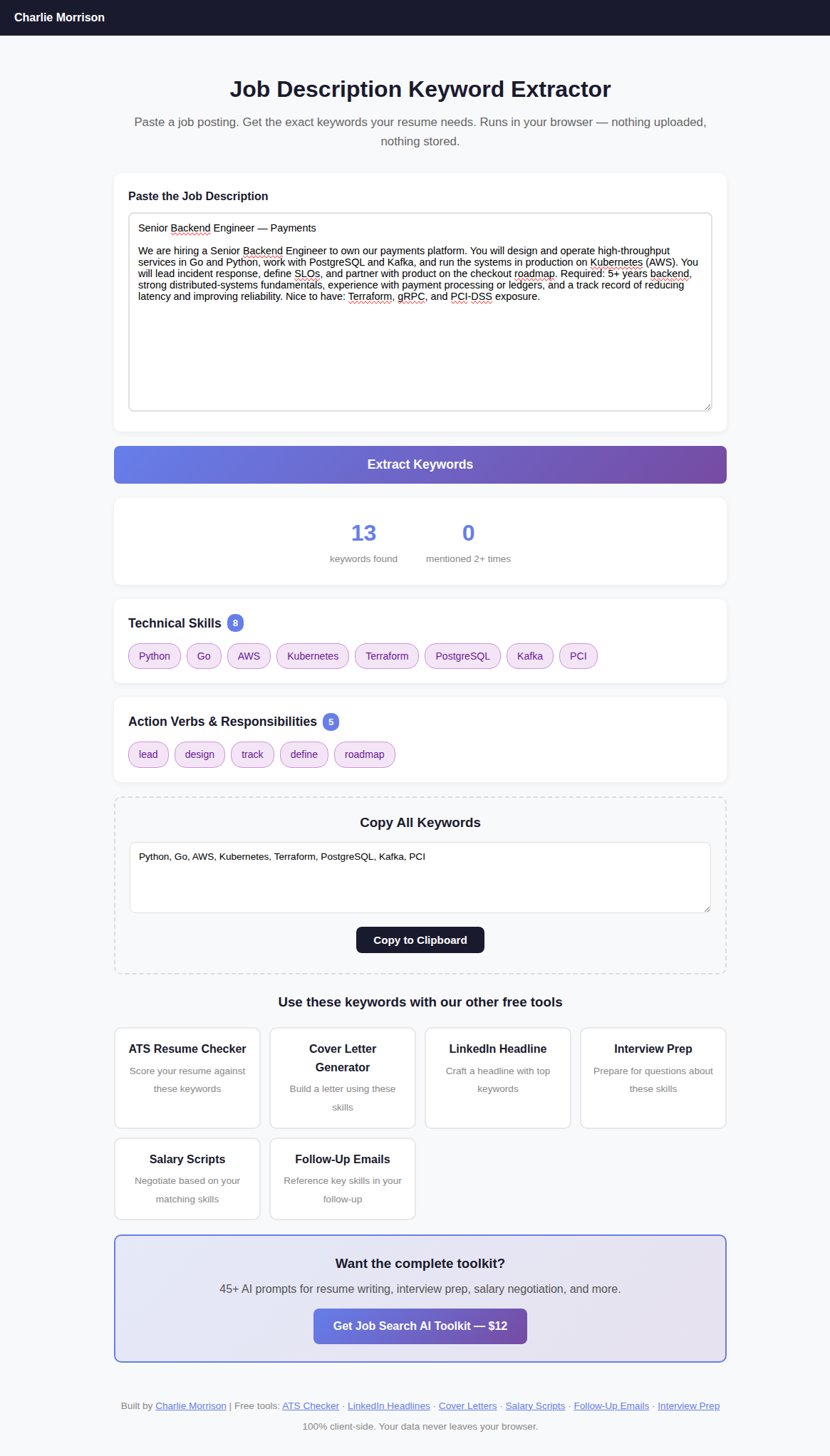
Paste the posting, get the exact technical skills and verbs it weights — 13 here, grouped and copyable.
It pulled thirteen terms in a couple of seconds — Kubernetes, Kafka, PostgreSQL, PCI, Terraform and the rest — and the only job left was to confirm each true one appeared in my resume in that wording. That is the whole tailoring step for an Easy Apply, done in well under a minute. It is the same extractor I leaned on when I ran 30 job descriptions through it to see how consistently postings telegraph their must-have keywords; they do, far more than people assume, which is exactly why this works.
Tailor every application in under a minute
The Job Search AI Toolkit bundles the keyword extractor with resume-bullet, cover-letter, and salary-script generators — the full set for matching each posting fast, without the 14-minute form.
Get the Job Search AI Toolkit — $12What I actually changed after the test
I did not pick a side in the channel war. I changed how I use both:
- Default to Easy Apply for speed, but never on autopilot. Before every click, paste the posting into the keyword extractor and confirm the true matches are in my resume. LinkedIn's own description of how Easy Apply works is honest that it submits your existing profile and resume as-is — which is exactly why a generic profile gets a generic result. The channel is fine; coasting on it is the problem.
- Reserve the 14-minute company-site forms for roles I genuinely want. If I am willing to spend a quarter hour, I am willing to tailor hard, and that is where the company site pays off. For roles I am only curious about, the slow form is not worth it — a tailored Easy Apply gets most of the benefit at a tenth of the time.
- Track replies by tailoring, not by channel. Once I started logging the column that actually predicted outcomes, the channel question stopped feeling important. The reply rate follows effort applied to matching the posting, wherever the form happens to live.
The cleanest way to say it: the company site does not beat Easy Apply — tailoring beats not-tailoring, and the company site just tricks you into tailoring. Take the trick away, keep the behavior, and you get the company-site reply rate at the Easy Apply price.
Common questions
Is LinkedIn Easy Apply really a black hole?
Not by itself. In this batch the Easy Apply roles I tailored replied at 50% — the same rate as tailored company-site applications. The black-hole reputation comes from how easy it is to send 20 generic ones in ten minutes without adjusting anything. The channel is not the problem; the autopilot it invites is. Slow down for the 30 seconds it takes to match the posting's keywords and Easy Apply performs fine.
Doesn't matching keywords just mean stuffing my resume?
No. The point is to use the posting's exact wording for skills you genuinely have — "Kubernetes" instead of "container orchestration," "PostgreSQL" instead of "relational databases" — so the screening pass can match them. Stuffing keywords you cannot back up gets caught in the first conversation and wastes everyone's time. Tailoring means accurate matching, not inflation.
How many applications a day does this allow?
Fewer than spray-and-pray, more than people fear. A tailored Easy Apply runs about two minutes end to end with the keyword step, so 10–15 a day is sustainable. The point of this test is that 10 tailored applications beat 40 generic ones on replies — so the lower number is the higher-yield play, not a compromise.
What counted as a "reply" in your numbers?
Any response from a human: a recruiter screen invite, a specific follow-up question, or a rejection that referenced something concrete from my application. Templated auto-rejections did not count, because they signal nothing about whether a person opened the file. Three weeks is a snapshot, so weigh the pattern over the exact percentages.
So the honest summary: across 40 applications the company career site replied at double the rate of Easy Apply, but that gap was mostly tailoring wearing a channel costume. Sorted by whether I matched the posting, tailored applications replied six times more often than generic ones, regardless of where I sent them. Use the fast channel, keep the slow channel's one good habit, and stop paying fifteen minutes for something a 30-second keyword check gives you for free.
If you want the pieces that make tailoring quick, the job keyword extractor and the ATS scanner comparison pair naturally with this — one tells you which words the posting wants, the other tells you whether a screener can find them in your resume.
← More posts