Free Content Calendar Tool vs Paid Schedulers: What You Actually Give Up (2026)
Every guide to "getting consistent on social" ends with the same nudge: get a scheduler. Buffer, Later, Hootsuite. Pick one, load your posts, walk away. It is good advice right up until you look at the invoice. So I asked a smaller, more honest question: for a solo founder or a one-person marketing team, which part of that monthly bill is buying you something you cannot get for free, and which part is buying you a step you could do yourself in ten minutes a week?
To answer it I put a free content calendar generator I built on this site head to head with the paid tools, on the same job. Not a feature-sheet comparison; those are written by whoever is selling. A real one: here is what the free tool produced, here is what the paid tools cost in 2026, and here is the exact line where the money starts buying something the free path can't.
What the free tool actually produced
I froze one case: a small bakery, Instagram, five posts a week, four weeks, twenty posts. I picked a local-business niche on purpose, because that is the exact customer who stares hardest at a $99 subscription and wonders whether it is worth it.
The generator returned the month in about a second. It chose the mix without being told any rule: thirty percent Educate, fifteen percent Engage, fifteen percent Behind the scenes, fifteen percent Inspire, fifteen percent Promote, ten percent Social proof. Promotion is the smallest slice. Every post came with a topic, a suggested format, a hashtag strategy (mix two broad, four niche, two community), and a best-time-to-post window. You can export the whole thing to CSV.
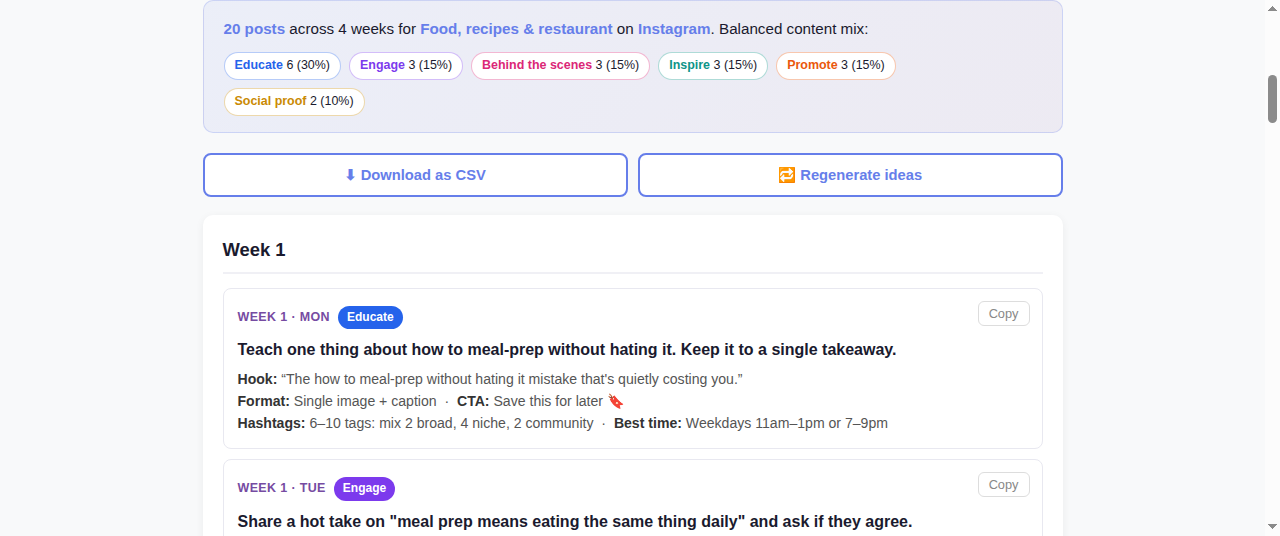
My own run: 20 Instagram posts for a bakery, a balanced pillar mix, and per-post hook + format + hashtag + timing guidance. Note the hook on the first post (more on that below).
That is the plan layer, and it is genuinely good. The mix it landed on lines up with what the established playbooks recommend. The rule of thirds and the 80/20 rule both say roughly the same thing: keep hard promotion to a minority and spend the rest teaching, engaging, and sharing. A blank calendar staring you down is what actually kills consistency, and this removes the blank calendar. For free.
It is not perfect, and I am not going to pretend it is. The auto-generated hooks come out of a template and some of them are grammatical nonsense. The very first post suggested the hook "The how to meal-prep without hating it mistake that's quietly costing you." That is not a hook, that is a stack of words. So the free tool hands you the topic, the format, the slot, and the hashtag plan; you still have to write the actual first line yourself. Fine. That is fifteen seconds a post, and nobody should be shipping AI's raw first draft anyway.
What the paid schedulers cost in 2026
Now the other side. Here is where the three big names actually sit this year:
| Tool | Free plan? | Entry paid tier (2026) |
|---|---|---|
| Buffer | Yes | Essentials $6/mo per channel; Team $12/mo per channel |
| Later | No (dropped it) | From ~$25/mo per social set, up to $110 |
| Hootsuite | No | Standard $99/mo (annual); ~$149/mo billed monthly |
Pricing as published mid-2026; tiers move around, so check the live page before you buy.
The spread is enormous. Buffer's own roundup of scheduling tools is candid that the category runs from free to a few dollars a channel for individuals and into the hundreds per seat for enterprise suites. Later's 2026 comparison is worth reading too, and notice that Later itself quietly retired its free plan, which tells you where the money in this business actually is. Hootsuite has no free tier at all and starts near a hundred dollars a month.
So a bakery that wants to plan and post to two Instagram-style channels is looking at, realistically, somewhere between free (Buffer's free plan, three channels, limited scheduling) and $99–$149 a month (Hootsuite) depending on how much tool they think they need.
The line where the money starts buying something real
Here is the honest verdict, and it is not "free always wins." Line the two paths up on what they each actually do:
| Job | Free planner | Paid scheduler |
|---|---|---|
| Decide what to post + the mix | Yes | Usually no, you still plan it |
| Per-post format + hashtag + timing guidance | Yes | Sometimes (add-ons) |
| Actually publish it for you (auto-post) | No, you paste manually | Yes |
| Queue weeks of posts to fire on schedule | No | Yes |
| Analytics: reach, best-time, engagement | No | Yes |
| Team approval workflows, multiple seats | No | Yes |
Read that table and the split is obvious. The paid tools are not selling you the plan. They are selling you the hands: auto-posting, queueing, analytics, and team collaboration. The strategy layer, what to post in what ratio with what hashtags at what time, is the part a free tool already nails, because that part is knowledge, not infrastructure.
So the decision comes down to one question about your own life:
- If you post by hand anyway (you open the app, paste the caption, hit share), then you are paying $25 to $149 a month for a scheduling feature you are not even using. A free planner plus five minutes a day of manual posting does the same work. This is most solo founders and local businesses.
- If auto-posting genuinely saves you real time (you manage several brands, or batch a month at once and never touch it again), then a scheduler earns its money, and you should still plan the content in a free tool first and only pay for the publishing rails. Even then, Buffer's free plan or its $6-per-channel tier covers most of it; you rarely need the $99 suite.
The trap is buying the expensive tool to solve a discipline problem. Scheduling software does not make you consistent; a plan you actually follow makes you consistent. If you are inconsistent now, a $99 empty queue will be just as empty next month.
How I'd actually set it up on a budget
If I were the bakery, here is the stack I would run, and it costs nothing until it has to:
- Generate the month in the free calendar tool, export to CSV. That is the plan, done in a minute.
- Rewrite each templated hook into one real first line. This is the only labor that matters and no tool at any price does it well for you.
- Batch-write the captions from the prompts once a week. If you want the caption skeletons pre-written so you only add the hook, that is exactly what a social media content pack is for.
- Post by hand, or, only if manual posting genuinely eats your time, load the batch into Buffer's free plan. Add a paid seat the day, and not before, that the free limits actually pinch.
That is the whole thing. You climb the paywall when the tool removes real friction, not when a blog post tells you a "real" business needs a subscription. I wrote up the fuller version of steps one and two in the month-of-social-posts experiment and the LinkedIn-specific run, if you want to see the raw output judged post by post.
Skip the blank calendar entirely
The 2026 Social Media Content Calendar bundles a full year of balanced post prompts plus 110 fill-in-the-blank caption templates. The plan and the skeletons done, so all you add is the hook and your voice. One payment, no monthly seat. Pairs with the free generator above.
Get the 2026 Content Calendar for $17FAQ
Do I really need a paid scheduler like Buffer, Later or Hootsuite?
Only if auto-posting and analytics save you real time. The strategy, what to post in what mix with which hashtags at what time, is knowledge a free planner already gives you. Paid tools sell the publishing rails: queueing, auto-posting, reporting, team seats. If you post by hand anyway, you are paying $25 to $149 a month for a feature you are not using. Plan free, pay only for the publishing step, and only when the free limits actually pinch.
Is there a genuinely free social media scheduler?
Buffer still has a free plan (three channels, limited scheduling), which is the closest to a free scheduler that also auto-posts. Later dropped its free plan in 2026 and Hootsuite has never had one. But there is a distinction worth keeping: a free planner (what to post) and a free scheduler (posts it for you) are different things. Combine a free planner with Buffer's free tier and you cover most of a solo operator's needs at zero cost.
What is the difference between a content calendar and a scheduler?
A content calendar decides the plan: which topics, what content mix, which format and hashtags, and when to post. A scheduler executes it: it holds your finished posts in a queue and publishes them automatically at the set time. You need the plan first regardless; the scheduler is an optional convenience on top. Many people pay for a scheduler and then never actually plan, which is backwards, and the plan is the part that changes your results.
How much should a small business spend on social media tools?
For a solo founder or local business, realistically zero to start: a free calendar generator, a free Buffer plan, and your own hands cover the whole loop. Add paid spend only when a specific limit blocks you: more channels than the free tier allows, a real need for analytics, or a second person who needs approval access. Buffer's $6-per-channel tier handles most of those cases long before you ever need a $99 enterprise suite.